How DNS Resolution Works
Self-taught Engineer | Disassembled my first PC at 16, been building ever since | Hardware fundamentals to software and coding| Obsessive learning | Built from scratch to scale
What happens when we type a website address in our browser? Ex- www.google.com It takes us to Google’s website. It feels to us nothing a very easy task which is actually not that simple. Let’s actually explore what happens when we type any website address in our browser.
Imagine you need to call someone from your phone. Generally what do u do? Do you dial directly his no. or you open your phonebook/ contacts app to open his name and place the call. Probably the later one right..This is similar to what happens when we type any website name in the web browser. The browser starts searching inside the phonebook of Internet. This phonebook of internet has address of contacts with name saved in it and it is accessed by browsers to find the exact address of the name which we put in the browser. Why do we don’t enter the exact addresses then instead?? Because it’s easy to remember names like (Google,Facebook). But on the other side computers can only understand numbers. So computer knows IP address and it goes like 142.250.190.78 and it belongs to (Google.com).
Technically, this whole phonebook of internet is what we call as Domain Name System (DNS). DNS translates the website/ domain names in to their exact IP address which then the browser processes and loads the resource. Each and every device connected on the internet has an IP address. There are two types of IP addresses : IPv4 and IPv6. Ex - IPv4→ 192.168.1.1 & IPv6→ 2400:cb00:2048:1::c629:d7a2
IP address is like the exact address of our house printed on our govt id cards or records. When anyone wants to locate our house they can visit us by using this address.
If you have to remember the IP address for every website, it’s almost not possible to use internet for all.
DNS helps us to eliminate this problem. It is like a globally distributed database which can translate domain names in to thier computer readable IP addresses. When we type a URL (Unifrom Resource Locator) in browser, DNS is the system behind that looks up for the corresponding number (IP address) so that we are connected.
Now to understand how this lookup happens, we need to know whats under the hood. So we have a tool which we call dig It’s a diagnostic tool → Domain Information Gropher (dig). It is used to query DNS servers and see exactly what info they hold. It’s like a direct link to the internet’s directory.
Before we know what dig provides us, we need to understand DNS Hierarchy. DNS is a distributed system organized layers. There are three layers :-
Root Servers (.) - Top of the hierarchy
TLD Servers (.com, .org, .in) - Manage top level domains
Authoritative Servers - Know the actual IP addresses
We can think of it as a complete address format :
Root → In which Country
TLD → In which City
Authorotative → Exact location of house
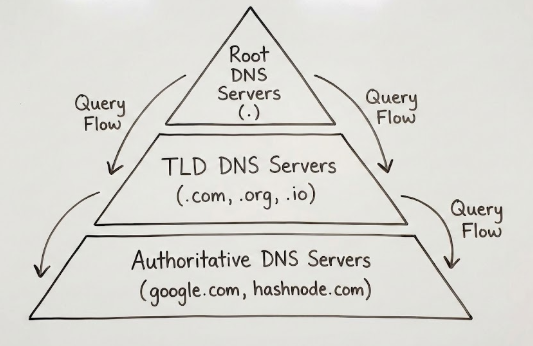
Above hierarchy can be seen using the tool dig . Let’s explore these layers one by one.
Step 1: The Root Name Servers
Every DNS journey starts at the “Root”. A dot (which we always ignore, but exists) represents the root in DNS terms. Ex: google.com
Let us ask dig that who runs the root zone. We will ask for the NS records.
NS Record (Name Server Record) → This is a crucial concept. An NS record doesn’t give you an IP address for a website. Instead it tells you which other server is responsible for managing a certain zone. It’s essentially a “delegation” sign pointing you elsewhere.
To try we can run the following commands in terminal
Run the following command in your terminal:
dig . NS
You will see a lot of output, but focus on the ;; ANSWER SECTION:.
;; ANSWER SECTION:
.            518400    IN    NS    a.root-servers.net.
.            518400    IN    NS    b.root-servers.net.
.            518400    IN    NS    c.root-servers.net.
... (letters up to m) ...
What this means ?? → We asked “Who manages the root(.) of the internet?” The answer is a list of 13 logical servers, named a.root-servers.net through m.root-servers.net.
These servers don't know the IP address for google.com. But they do know who handles everything ending in .com
Step 2: The TLD Name Servers
Next, we need to find the servers responsible for the ".com" Top-Level Domain (TLD). In a real scenario, the Root servers would tell us this information.
Let's simulate this by asking dig: "Who are the Name Servers (NS) responsible for the com zone?"
Run this command:
dig com NS
Look at the answer section :
;; ANSWER SECTION:
com.            172800    IN    NS    a.gtld-servers.net.
com.            172800    IN    NS    b.gtld-servers.net.
...
What this means → These gtld-servers.net (Generic Top Level Domain servers) are responsible for every single domain name that ends in .com. If we were looking for hashnode.dev, we would have queried for dig dev NS instead.
These servers still don't know the specific IP for Google. But they know exactly which company's servers have been authorized to handle Google's DNS records.
Step 3: The Authoritative Name Servers
We are almost there. We need to find the "Authoritative" server for google.com. This is the server that Google itself configures to be the "source of truth" for their domain.
We ask the TLD servers: "Who is the Name Server for google.com?"
Run this command:
Bash
dig google.com NS
The output shows us Google's specific DNS servers:
Bash
;; ANSWER SECTION:
google.com.        168376    IN    NS    ns1.google.com.
google.com.        168376    IN    NS    ns2.google.com.
google.com.        168376    IN    NS    ns3.google.com.
google.com.        168376    IN    NS    ns4.google.com.
What this means: We have finally found the definitive source. ns1.google.com (and the others listed) are the servers that actually hold the IP addresses for Google services. They are → authoritative
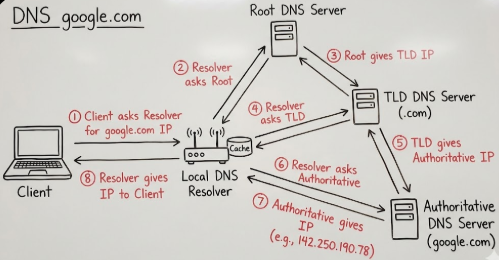
Complete Full Picture: Putting It All Together
In this article we just manually walked through the steps of DNS resolution by finding the Name Servers at each layer.
We found the Root.
The Root pointed us to the
.comTLD servers.The
.comTLD servers pointed us to Google's Authoritative servers.
Now, we can finally ask the authoritative server for the actual address. When we just want an IP address (IPv4), we ask for an A Record.
Bash
dig google.com A
Bash
;; ANSWER SECTION:
google.com.        201    IN    A    142.250.190.78
Success! We have the IP address 142.250.190.78.
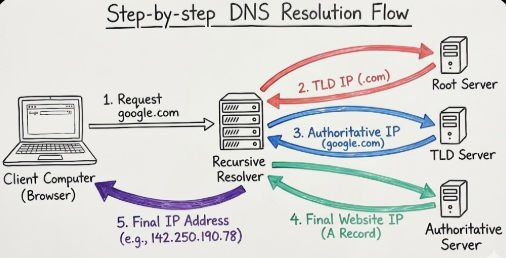
When you type google.com into Chrome, your computer doesn't actually run these four separate commands.
Instead, your computer asks a Recursive Resolver. What ??
"Recursive Resolver" :
A recursive resolver is a server, usually provided by your Internet Service Provider (ISP) or a public service like Google DNS (8.8.8.8) or Cloudflare (1.1.1.1). Its job is to perform the entire journey we just read above, through on your behalf, memorize the answer (caching) for a while to make future requests faster, and just return the final IP address to your browser.
A complete flow looks like when you browse the web:-
Conclusion
DNS is one of those incredible technologies that works so well we rarely notice it. It turns the complex, numerical reality of network routing into the human-friendly web we use today.
By understanding the hierarchy of Root, TLD, and Authoritative servers and how tools like [dig] reveal these layers you now have a clearer picture of the massive, distributed system that springs into action every time you click a link.


